HowTos
- How to Override Styles of Third-Party Components
- How to Override Property Type In Derived Interfaces
- How to Set Properties of a Web Component
- Angular: Sorting Arrays
How to Override Styles of Third-Party Components
This is a quick how to, for overriding the styles used inside third party angular components.
For example: The Clarity angular library includes a datagrid (clr-datagrid), which has an obligatory margin at its top and bottom, which creates too much whitespace when attempting to visually add controls to the datagrid.
Note how the Previous and Next buttons sit too high off the top of the datagrid to visually belong to it.
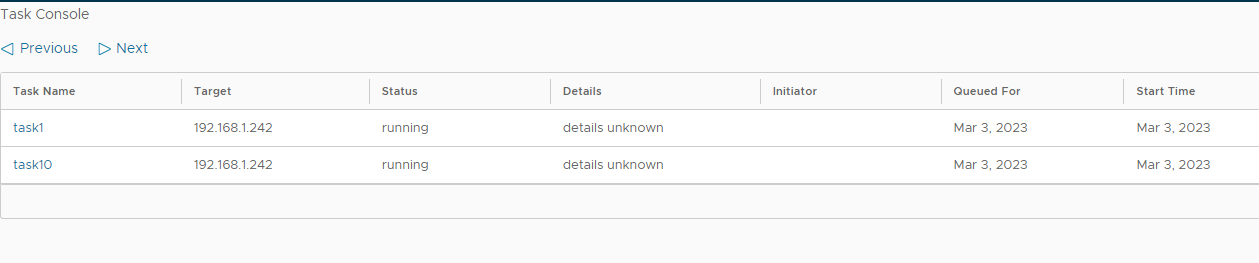
But, adding a global style (in the global styles.scss file) can override the class style of a third party library.
Here’s a style in the global style file that gets rid of the margin above the clarity datagrid, fixing the above problem:

NOTE: an additional class name was added, so that our global style override would only affect the desired datagrid instance in our application.
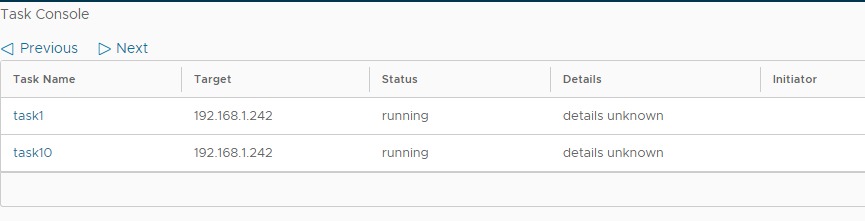
Adding this global style got rid of the top margin of the above datagrid instance, making it look better… like this:
This override method was taken from here: Overriding CSS properties of third-party components in Angular
How to Override Property Type In Derived Interfaces
Sometimes, an interface is created that the wrong datatype for a property.
This can be because the interface is from a third-party or because you are composing a more specific interface type and need to swap out more generic properties of the base type.
Taken from here: https://bobbyhadz.com/blog/typescript-override-interface-property
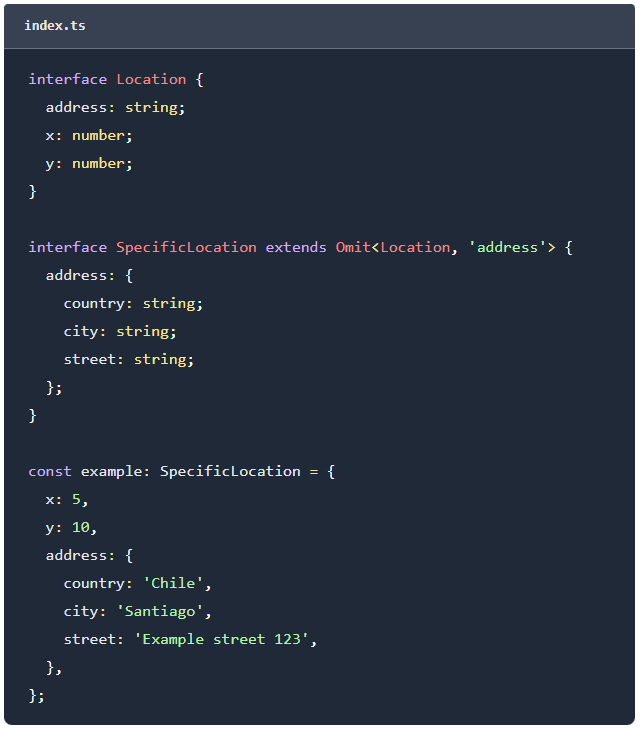
Since TypeScript is compiled to javascript, it includes a utility, called Omit, that can do the type swapping work during compilation. An Omit declaration replaces the standard extends declaration of the interface by including a list of properties to be left out.
The Omit utility type constructs a new type by removing the specified keys (as a pipe-delimited list) from the existing type.
Here is an example base interface, and a derived interface, using Omit, to change the data types of the base:
How to Set Properties of a Web Component
Attribute binding can get complex. Here’s a running list of examples of how to do it.
To set properties on a Web Component use the Angular [property] binding syntax. To listen to events use the Angular (event) binding syntax.
<!--
- status - attribute style hook
- [closable] - setting the 'closable' property on the element
- (closeChange) - listen for the 'closeChange' custom event
-->

<cds-alert status="info" [closable]="true" (closeChange)="log($event.detail)">
  Hello World
</cds-alert>
Angular: Sorting Arrays
Here’s a simple technique for sorting an array of objects.
It accepts a simple function that returns a 1 or -1 result.
// The questions property is an array of objects with a display order property.
// We want them to be ordered ascending.
// NOTE: The sort method returns the sorted array.
let ql = this.questions.sort((a, b) => (a.displayOrder < b.displayOrder) ? -1 : 1);
This will sort descending:
// The questions property is an array of objects with a display order property.
// We want them to be ordered descending.
// NOTE: The sort method returns the sorted array.
let ql = this.questions.sort((a, b) => (a.displayOrder > b.displayOrder) ? -1 : 1);