Ansible
- Deploy a DotNet Service with Ansible
- Ansible Generic Commands
- Ansible Command References
- Debugging Ansible Playbook
- Ansible Commands Cheat Sheet
- Target Host Errors
- Cleaning up Ansible Temp Folders
Deploy a DotNet Service with Ansible
The following shell command will deploy the binaries and appropriate configuration for a service, to an inventoried host:
ansible-playbook deploy-service.yml \
-e "var_host=blissdev" \
-e "var_binrepo=oga-built-dev" \
-e "var_servicename=OGA.HostControl.Service" \
-e "var_description=OGA.HostControl.Service" \
-e "var_company=bliss" \
-e "var_envname=dev" \
-e "var_hasnotification=true" \
-e "var_ipaddress=192.168.1.201" \
-e "var_port=4180" \
--ask-vault-pass
NOTE: The hasnotification variable is only required for the service that needs a firebase configuration.
Currently, this is the cloud service test.
NOTE: Set the Jenkins user password in the “userpass” argument.
Set the service name argument to the name of the service to deploy:
Bliss.SignupService.APIcloudservice_test1
Set the var_host to the inventoried host that will receive the service install.
These are listed in the host inventory file in Ansible.
Set the environment name to specify which set of configuration data will be included with the service.
This can be set to dev or prod.
Ansible Generic Commands
To list hosts in inventory:
ansible-inventory --list -y
To ping all hosts:
ansible all -m ping -u glwhite
To scan a playbook for tasks without making changes:
ansible-playbook myplaybook.yml --list-tasks
To get a list of hosts affected by a playbook:
ansible-playbook myplaybook.yml --list-hosts --ask-vault-pass
To run a playbook:
ansible-playbook playbook.yml --ask-vault-pass
Adding the “--ask-become-pass" argument, tells Ansible to ask for the user password for the account it uses.
Adding the “--ask-vault-pass" argument, tells Ansible to ask for the vault password that it can use to decrypt the vars file that contains the become sudo password.
Ad-hoc command t list NFS shares:
ansible testservers -m shell -a 'df -h -T|grep -i nfs' -i ansible_hosts
Ansible Command References
Here’s a large list of possible ansible commands:
Ansible AD HOC Command Examples - Ansible Cheat Sheet | Devops Junction
Introduction to ad hoc commands — Ansible Community Documentation
Ansible Playbook Examples - Sample Ansible Playbooks | Devops Junction
Ansible apt module Examples - install packages with apt | Devops Junction
Ansible Playbook Examples - Sample Ansible Playbooks | Devops Junction
Debugging Ansible Playbook
Here are command line switches to enable debug logging of an ansible playbook:
#Specify the location for the log file
export ANSIBLE_LOG_PATH=~/ansible.log
#Enable Debug
export ANSIBLE_DEBUG=True
#Run with 4*v for connection level verbosity
ansible-playbook -vvvv ...
Ansible Commands Cheat Sheet
Here’s a list of common ansible commands…
Read through this DevOps book pdf for getting Docker and Ansible to work together: https://bjpcjp.github.io/pdfs/devops/ansible-docker.pdf
Host Setup
Host Setup Playbook
This playbook will do basic setup of common packages and config that each host requires, such as ssl certs, permissions, and base packages.
It is run for each host by specifying the hostname in arguments.
ansible-playbook host-setup.yml -e "variable_host=wshost1" --ask-vault-passLocal Build Server Setup
These are playbook calls to set up the build server VM.
ansible-playbook buildserver.yml --ask-vault-passLocal Dev Host Setup
These are playbook calls to set up each development host with their particular build of services and config.
ansible-playbook dev-host1.yml --ask-vault-pass
ansible-playbook dev-host2.yml --ask-vault-pass
ansible-playbook dev-host3.yml --ask-vault-pass
Cloud Dev Host Setup
These are playbook calls to set up each cloud development host with their particular build of services and config.
ansible-playbook dev-cldev1.yml --ask-vault-pass
ansible-playbook dev-cldev2.yml --ask-vault-pass
Prod Host Setup
These are playbook calls to set up each production host with their particular build of services and config.
ansible-playbook prod-host1.yml --ask-vault-pass
ansible-playbook prod-host2.yml --ask-vault-pass
ansible-playbook prod-host3.yml --ask-vault-pass
ansible-playbook prod-host4.yml --ask-vault-pass
ansible-playbook prod-host5.yml --ask-vault-pass
ansible-playbook prod-host6.yml --ask-vault-pass
Personal Host Cluster Setup
Here is how to run commands on the PHC.
ansible-playbook phc-admin01-rundk-admin-webui.yml --extra-vars "ansible_become_pass=password" --extra-vars "jenkins_password=password"
ansible-playbook phc-backups01-rundk-backups-webui.yml --extra-vars "ansible_become_pass=password" --extra-vars "jenkins_password=password"
Target Host Errors
Missing Python Libraries
If you have an Ansible playbook that is failing on a target host, it's likely that the Python libraries on the target host, are incompatible with the version of Ansible.
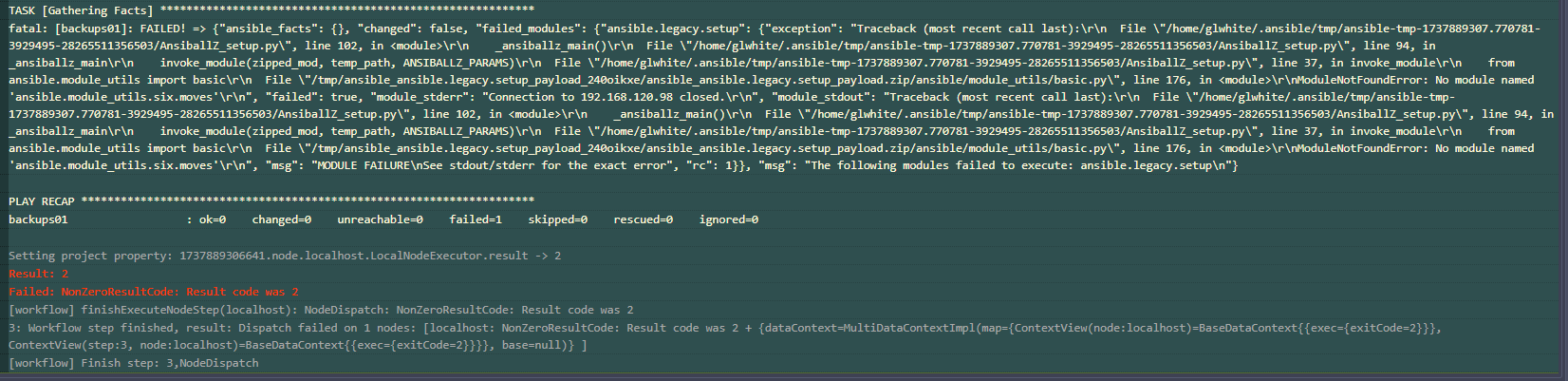
This would present with an error message starting with:
An exception occurred during task execution. To see the full traceback, use -vvv. The error was: ModuleNotFoundError: No module named 'ansible.module_utils.six.moves'Here's what it would look like when running the playbook from the command line:

Here's what it would look like when running from RunDeck:
You can either downgrade the python library to a compatible version.
Or, upgrade Ansible to a version that is compatible with the Python library on the target host.
See this page for the Python version range that each version of Ansible supports: https://docs.ansible.com/ansible/latest/reference_appendices/release_and_maintenance.html
Cleaning up Ansible Temp Folders
As Ansible playbooks run, some will fail to cleanup temp folders on the Ansible server.
Since the temp folder for most Ansible jobs is configured as '/home/glwhite/Desktop', this will cause an accumulation of folders in that user's Desktop.
The folders are named with a unix timestamp.
So, the following command will delete them:
find ~/Desktop -maxdepth 1 -type d -name '[0-9]*' -exec rm -r {} +You can preview the list of files to delete with this:
find ~/Desktop -maxdepth 1 -type d -name '[0-9]*'