# Windows .SSH Config File Syntax

Here are use cases that require editing the SSH config file in your Windows user profile.

## References<button aria-hidden="false" aria-label="Copy link to heading" class="cc-1r0b9w7" data-testid="anchor-button" tabindex="-1" type="button"><svg height="24" role="presentation" viewbox="0 0 24 24" width="24"></svg></button>

Syntax reference for the SSH config file is here: [https://www.ssh.com/academy/ssh/config](https://www.ssh.com/academy/ssh/config "https://www.ssh.com/academy/ssh/config")

Tutorial for creating them: [https://betterprogramming.pub/a-step-by-step-walkthrough-to-create-your-first-ssh-config-file-f01267b4eacb](https://betterprogramming.pub/a-step-by-step-walkthrough-to-create-your-first-ssh-config-file-f01267b4eacb "https://betterprogramming.pub/a-step-by-step-walkthrough-to-create-your-first-ssh-config-file-f01267b4eacb")

## General<button aria-hidden="false" aria-label="Copy link to heading" class="cc-1r0b9w7" data-testid="anchor-button" tabindex="-1" type="button"><svg height="24" role="presentation" viewbox="0 0 24 24" width="24"></svg></button>

In Windows, the SSH config file is located, here: c:\\&lt;user&gt;\\.ssh\\config.  
In Linux, it would be here: ~/.ssh/config

  
An SSH config file will look something like this:

```c#
# Read more about SSH config files: https://linux.die.net/man/5/ssh_config
Host 192.168.1.89
    HostName 192.168.1.89
    User glwhite

Host updateserver
    HostName 192.168.1.160
    User glwhite
    IdentityFile K:\keys\ecdsa-key-glwhite-desktop-20221115\ecdsa-key-glwhite-desktop-20221115.key

# Added this block to allow git to use the correct ssh key when authenticating to github.com
Host github.com
    HostName github.com
    User git
    IdentityFile ~/.ssh/ecdsa-glwhite-DesktopJ60PCHC-github-20230118

# linux debug test vm
Host 192.168.1.90
    HostName 192.168.1.90
    User glwhite
    
```

The above example shows several host entries.  
Some of the entries are added automatically, when accepting the public SSH key of a host on new connection.  
Others, can be manually added by following the above as examples.

<p class="callout info">Note that some entries specify an SSH key, via 'IdentityFile'.  
This is how you can assign a non-default SSH key pair to a particular connection.  
</p>

<p class="callout info">If an IdentityFile entry is not specified, SSH will use the default key at:  
The default for protocol version 1 is `~/.ssh/identity`.  
For protocol version 2, it is `~/.ssh/id_rsa` or `~/.ssh/id_dsa`.</p>

### VSCode Remote Explorer via SSH<button aria-hidden="false" aria-label="Copy link to heading" class="cc-1r0b9w7" data-testid="anchor-button" tabindex="-1" type="button"><svg height="24" role="presentation" viewbox="0 0 24 24" width="24"></svg></button>

When using the Remote Explorer plugin in VSCode, you will likely need to setup an SSH key for access.

Follow the normal methods to setup the key pair.

NOTE: Modern Ubuntu hosts will disallow RSA keys. So, create keys with ECDSA.

Be sure to add the public key to the Authorized\_keys file on the target host.

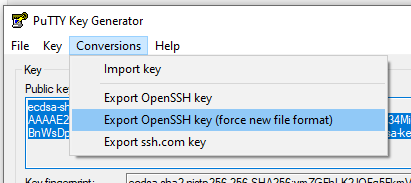
If you created the private key with PuttyGen, make sure to save a key in the OpenSSH key format, by using this:

[![image.png](https://wiki.galaxydump.com/uploads/images/gallery/2025-01/scaled-1680-/4bdiNtgkizrWIa94-image.png)](https://wiki.galaxydump.com/uploads/images/gallery/2025-01/4bdiNtgkizrWIa94-image.png)
Now, open your SSH config file at: C:\\&lt;user&gt;\\.ssh\\config.

Create a host entry in the config file, that has this form:

```c#
Host updateserver
    HostName 192.168.1.160
    User <username>
    IdentityFile <Filepath to key file>
    Port 22
```

Here’s what each field means:

<div class="highlighter-context page view" data-inline-comments-target="true" data-testid="page-content-only" id="bkmrk-host---is-the-friend"><div class="_19pkidpf _2hwx1wug _otyridpf _18u01wug _1bsb1osq"><div><div class="wiki-content css-1ugufav e5xcnr80" data-test-appearance="full-page" data-testid="pageContentRendererTestId"><div class="renderer-overrides"><div class="ak-renderer-wrapper is-full-page cc-1jke4yk"><div class="cc-1yfvxby"><div class="ak-renderer-document">- Host - is the friendly name of the target
- HostName - is the IP address or FQDN
- User - is the username that your session will login as. This is also the user, who’s Authorized\_keys file contains the matching public key to the private key at the IdentityFile path
- IdentityFile - This is the Windows-formatted filepath to the private key.
- Port - optional parameter, if the SSH server doesn’t listen on 22.

</div></div></div></div></div></div></div></div>Here’s an example of what a host entry would look like for accessing an Ubuntu VM with a private key:

```c#
Host updateserver
    HostName 192.168.1.160
    User glwhite
    IdentityFile K:\keys\ecdsa-key-glwhite-desktop-20221115.key
```

<div class="highlighter-context page view" data-inline-comments-target="true" data-testid="page-content-only" id="bkmrk--1"><div class="_19pkidpf _2hwx1wug _otyridpf _18u01wug _1bsb1osq"><div><div class="wiki-content css-1ugufav e5xcnr80" data-test-appearance="full-page" data-testid="pageContentRendererTestId"><div class="renderer-overrides"><div class="ak-renderer-wrapper is-full-page cc-1jke4yk"><div class="cc-1yfvxby"><div class="ak-renderer-document">  
</div></div></div></div></div></div></div></div>## Committing to Github from Visual Studio<button aria-hidden="false" aria-label="Copy link to heading" class="cc-1r0b9w7" data-testid="anchor-button" tabindex="-1" type="button"><svg height="24" role="presentation" viewbox="0 0 24 24" width="24"></svg></button>

By default, Visual Studio will only use the ssh keys in your ssh folder that have the recognized default names.

So, if your existing key has a non-default name, you’ll need to create a host entry to pair the key with the target host ([github.com](http://github.com/ "http://github.com/") in our case).

Open your ssh config file, located here: C:\\Users\\&lt;username&gt;\\.ssh\\config

The following example is what a host entry would look like that assigns a particular key to a host:

```c#
# Added this block to allow git to use the correct ssh key when authenticating to github.com
Host github.com
	HostName github.com
	User git
	IdentityFile ~/.ssh/LeeWhite187-github-usl084805-20220815
```

<p class="callout info">It may be necessary to restart the openssh service, after making changes to the config file.</p>

Once updated, you can now test if Visual Studio lets you push and pull from a Github repository.