Windows
Validating AD Machine Account
NOTE: If you are looking to fix a machine account, see this page: Windows: Repair a Domain Machine Account
Here's a couple ways to validate the machine account of a PC in an Active Directory domain:
NOTE: This must be run from an elevated window.
dsregcmd /statusIf successful, it will output a device state of DomainJoined: yes.
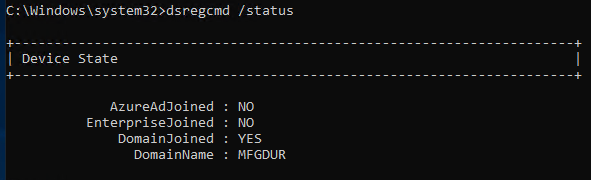
NOTE: It outputs several blocks of info. So, you may have to scroll up to see the status.
Also. You can use this:
NOTE: This must be run from an elevated window.
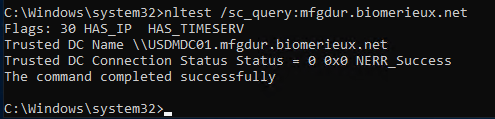
nltest /sc_query:<<domain name>>If successful, it will give a NERR_Success status, like this:
Windows: Repair a Domain Machine Account
Here's a quick way to repair the domain membership for a machine account.
It doesn't require two reboots and new machine account churn.
To do so, open an elevated command line prompt and do this:
Test-ComputerSecureChannel -Verbose
# and only if that returns False:
Test-ComputerSecureChannel -Repair -Credential MFGDUR\<your-admin-account>
The repair resets the machine-account password with the domain in seconds, no reboot, no rejoin.
Once executed, verify domain membership, by following this page: Validating AD Machine Account