How to Stop Cell HotSpot Throttling
Here's a simple thing to do, to get around hotspot throttling when tethered to a phone.
What's happening is that your cell provider is watching the TTL value of packets coming to the cell tower, and looking for ones that have hopped through your cell phone (as tethered traffic).
Normal traffic reaching the cell network would have a TTL of 64, and the cell network decreases that to 63.
However, a tethered device starts with a 64, and your phone, as the tethered intermediary, decreases the TTL of packets to 63.
Your cell provider watches for packets marked with 63, to know what is tethered traffic.
And since carriers like to throttle tethered traffic, they will apply throttling to packets with TTL=63.
To get around this, you need your tethered traffic to appear like it came from the phone, itself.
To do this, we increment the initial TTL at the PC, so the phone will decrement it to 64.
And in doing so, the traffic will appear, to the cell network, as if it came from the phone.
This works, reliably on T-Mobile and Verizon.
Here's the command to execute on a Windows PC:
netsh int ipv4 set glob defaultcurhoplimit=65NOTE: Run in an elevated terminal.
NOTE: The effect is immediate. So, there's no need to restart anything.
Once done, set it back to TTL of 64 with:
NOTE: I've added how to revert this, for cleanliness.
But, it is not necessary to reset the value, when done.
There is no detrimental effect from a +1 offset to packet'packet TTL.
Packets will just be allowed "one more" hope before dying.
netsh int ipv4 set glob defaultcurhoplimit=64IPV6
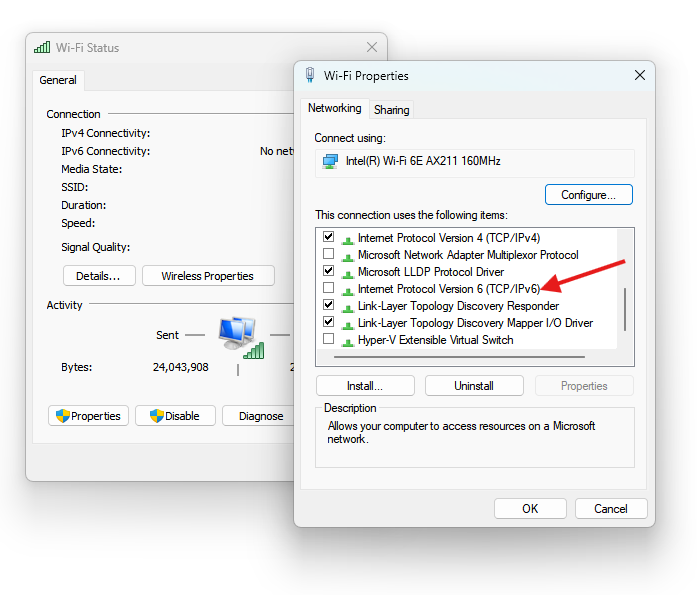
For some sites, you will also need to disable IPV6 on your wifi adapter, as well.
To do so, open the adapter settings, and uncheck IPv6 protocol usage for your wifi adapter, like the below example: