
Debian: Offline Package Installation
If you need to add services or packages to a VM that has no internet access to pull down packages, here's an offline method.
Comparable VM
NOTE: In order to correctly retrieve packages that an offline VM requires, you should have access to a similar VM with internet access.
This ensures that you can fetch any secondary dependencies (of the target package) that are needed by the same Distro/version.
Log into the surrogate VM that has internet access.
This is where you will download the packages.
Process Steps
For demonstrations purposes, we will attempt to perform an offline install of SubVersion on a Debian 13.4 VM, using a surrogate Debian 13.5 VM with internet access.
Log into the surrogate VM.
Create a folder where you will download packages:
mkdir ~/Desktop/temppkg/subversion

cd ~/Desktop/temppkg/subversion
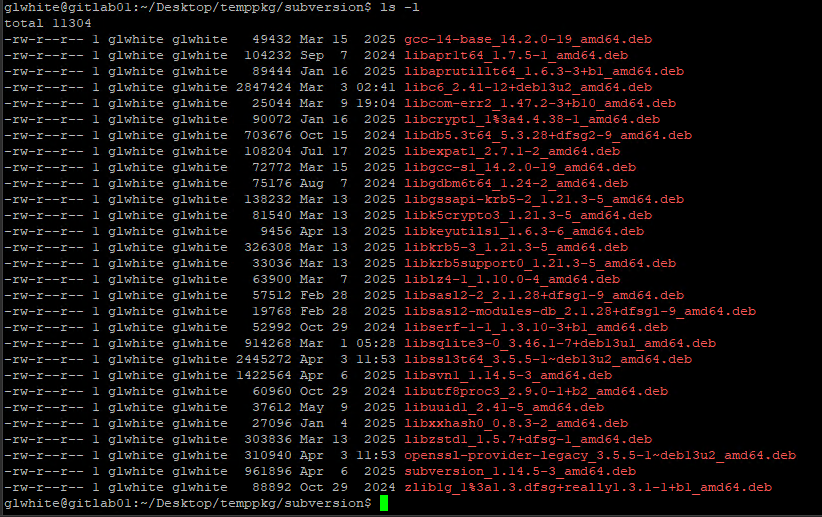
Once inside the folder, we will download the desired package and secondary dependencies.
This will download the set needed.
apt-get download $(apt-rdepends subversion | grep -v "^ ")Here's what the downloaded dependency set looks like, today:
Next, you need to move all dependencies over to the target VM, by whatever means you have.
For me, I copied them out of the surrogate, via SCP.
Then, across the network boundary as content in an SVN repository.
Then, another SCP push to a temporary folder on the target VM.