
ESXi - Fixing Inaccessible NFS Share
NOTE: See bottom of article for esx243 NFS script.
To fix this isn’t a simple right-click reconnect, unfortunately.
So, here goes…
Open a Putty session to the ESX host as the root user.
Run this to list NFS shares:
esxcli storage nfs listIt might not come up with anything. No worries.
esxcli storage nfs41 listItAs mightreference, nothere's comewhat upthe withstorage anything.list Nonormally worries.looks like:

Open a web session to your ESX host, and copy out the datastore name (the inaccessible one), like this:
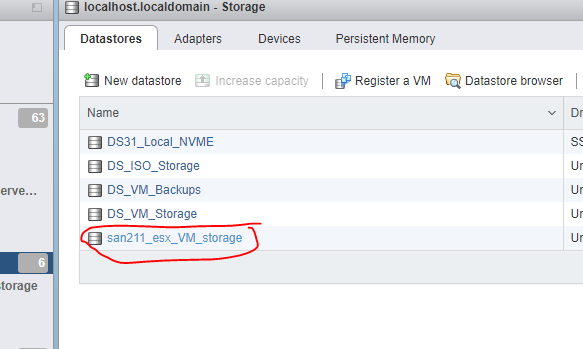
Now, delete the inaccessible share by running the following from the Putty session:
esxcli storage nfs remove -v DATASTORE_NAMENOTE: Replace DATASTORE_NAME with the name of the datastore you got from the ESX host web UI.
The above command will forcibly remove the NFS share.
You should be able to confirm it is gone from the web UI.
Once it is gone, you need to re-add the datastore by creating a new one.
The config dialog would look like this:
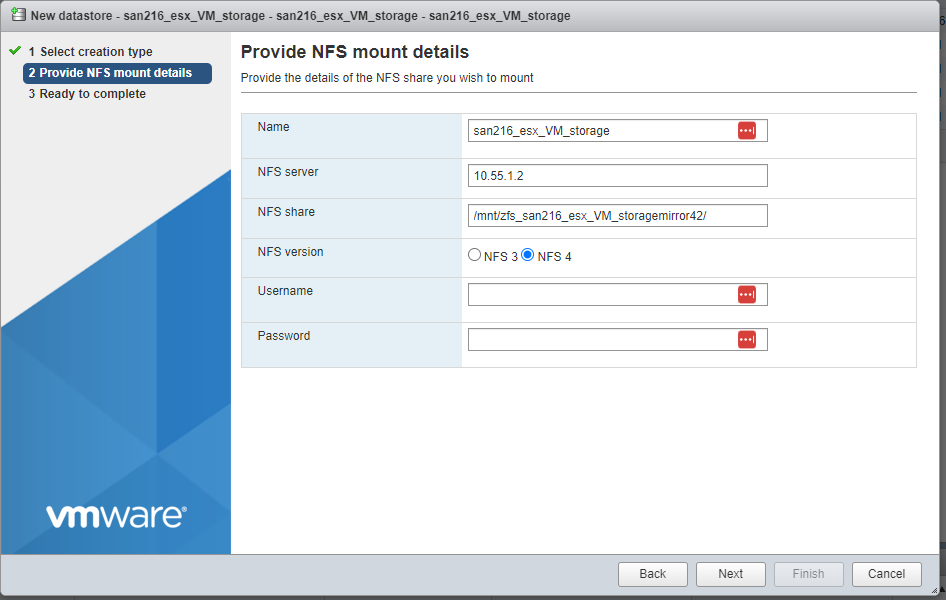
Once done, you should be able to refresh the web UI and the “inaccessible” states will slowly go away as VMs are scanned.
The add datastore can also be scripted by doing the add from the command, of this form:
esxcli storage nfs add -H HOST -s ShareName/MountPoint -v DATASTORE_NAME
Here’s a script for fixing the inaccessible NFS share of SAN216 on ESX243 whenever the power goes out:
esxcli storage nfs remove -v san216_esx_VM_storage

esxcli storage nfs41 add -H 10.55.1.2 -s /mnt/zfs_mirror42/san216_esx_VM_storage -v san216_esx_VM_storage
Here’s a script for fixing the inaccessible NFS share of SAN211 on ESX243 whenever the power goes out:
esxcli storage nfs remove -v san211_esx_VM_storage

esxcli storage nfs41 add -H 10.55.0.2 -s /mnt/zfs_mirror/san211_esx_VM_storage -v san211_esx_VM_storage
Fixing SAN211 Shares
If the datastores from SAN211 are showing as inaccessible, run these to remove and readd each one.
This one will remove and readd the ISO datastore...
esxcli storage nfs41 remove --volume-name DS_ISO_Storage

esxcli storage nfs41 add \
  --hosts 10.55.0.2 \
  --share /mnt/zfs_z2/esx_iso_storage \
  --volume-name DS_ISO_Storage
This one will remove and readd the VM backup datastore...
esxcli storage nfs41 remove --volume-name DS_VM_Backups

esxcli storage nfs41 add \
  --hosts 10.55.0.2 \
  --share /mnt/zfs_z2/esx_VM_Backups \
  --volume-name DS_VM_Backups
This one will remove and readd the ISO datastore...
esxcli storage nfs41 remove --volume-name DS_VM_Storage

esxcli storage nfs41 add \
  --hosts 10.55.0.2 \
  --share /mnt/zfs_z2/esx_VM_storage \
  --volume-name DS_VM_Storage