
Debian 13: Use Private NTP Server
Status
For hosts in isolated VLANS, we provide access to a local NTP server, via firewall rules.
The local NTP server is at: 192.168.1.12.
See this page for the local NTP server: Local GPS NTP Time Server
The main router includes a floating firewall rule that forwards UDP port 123 requests to the local NTP server.
It includes most of the VLANS. But can be updated to include other VLANs.
Configuration
Here are steps to configure an isolated Debian 13 VM to use the local NTP server.
NOTE: Debian 13 uses a service called, timesyncd.
Timesyncd is not as precise as true NTP.
But, it is good enough.
Timesyncd is installed by default.
We will use it.
You can verify timesyncd is running with this:
timedatectl show-timesync --all
Edit the config file to listen to the local NTP server.
Open it with:
sudo nano /etc/systemd/timesyncd.confIt will be mostly commented out, by default.
This is because the service is using config defaults, or compiled defaults.
Update it to point to the local ntp server, like this:
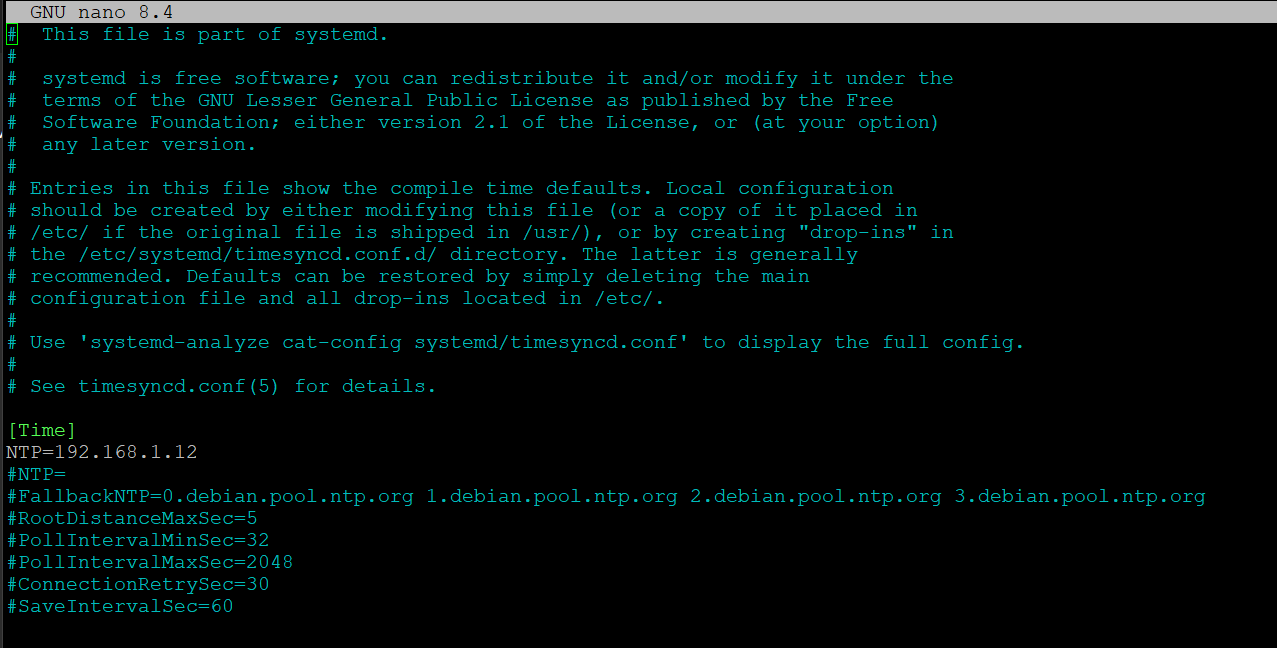
Close and save the config.
Once saved, restart the timesyncd service with:
sudo systemctl restart systemd-timesyncdYou can check the service status with this:
timedatectl show-timesync --all
No Comments